> ## Documentation Index
> Fetch the complete documentation index at: https://polyai-mintlify-7055a538.mintlify.site/llms.txt
> Use this file to discover all available pages before exploring further.
# Send SMS
> Trigger an SMS directly from Managed Topic actions
Add an SMS action to a Managed Topic so your agent can send text messages to callers during a conversation – for example, sending a link, confirmation, or reference number.
You must complete the [SMS setup](/voice-channel/message-templates) (connect Twilio, create templates) before you can add SMS actions to topics.
## How SMS actions work
When a topic with an SMS action is matched, the agent follows your prompt to determine *when* to send the message. Typically, you instruct the agent to ask for consent before sending – the SMS is not sent automatically just because the topic matches.
## Adding an SMS trigger
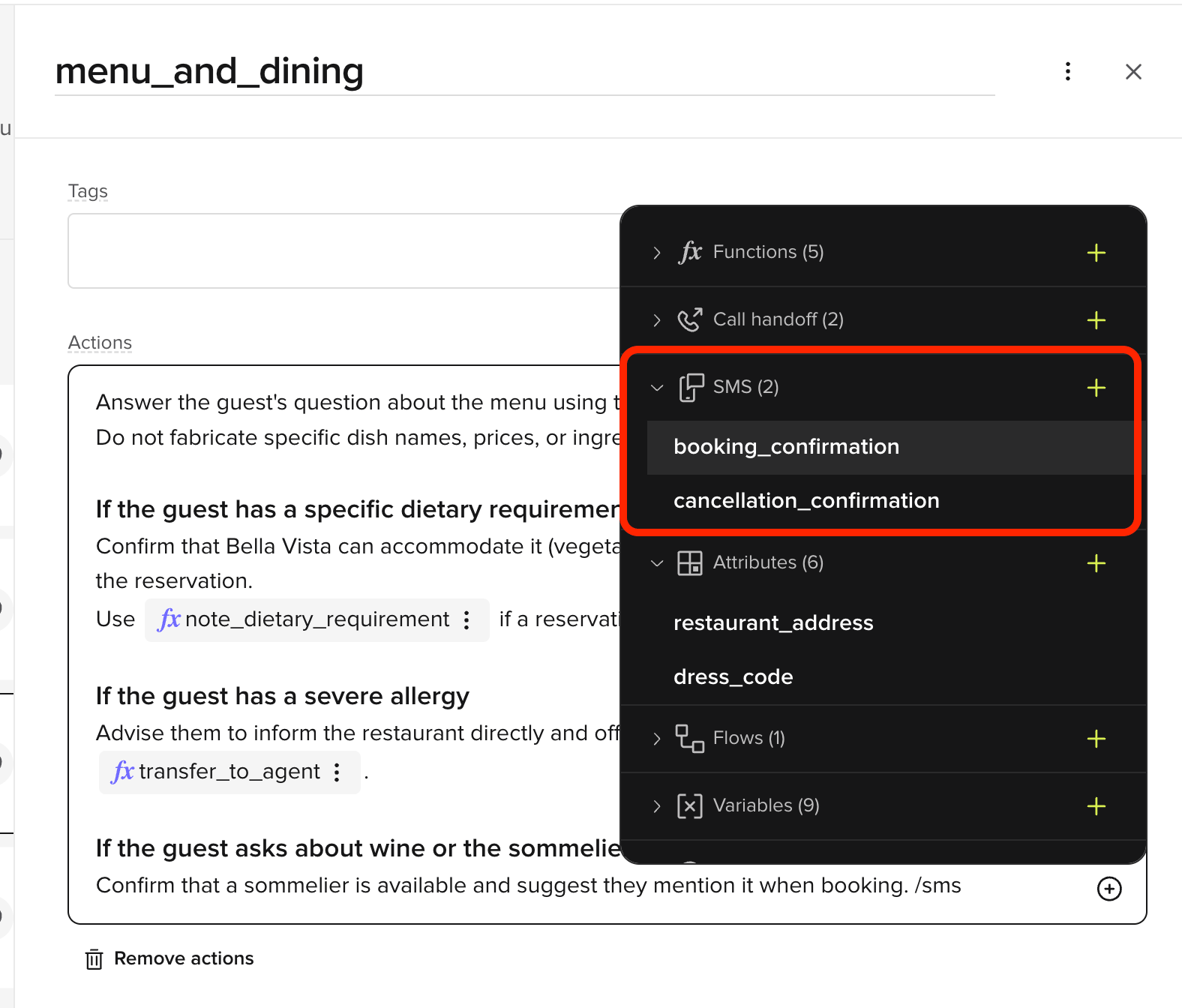
Add an SMS trigger to a topic's **Actions** field using any of these methods:
1. Type `/` in the Actions field to open the insert menu and choose your template from the **SMS** group (e.g. `booking_confirmation`, `cancellation_confirmation`)
2. Right-click in the Actions field and choose a template from the **SMS** group
3. Click the **+** icon on the right side of the field and select a template from the **SMS** group
 ## Selecting the SMS template
1. In the **SMS** group of the insert menu, choose an existing template.
2. To create a new template, click **+ Add SMS template**. This opens the **Add SMS template** modal (also reachable from **Knowledge**), where you define the message content and phone number. Once saved, the template can be used in your knowledge base or rules and is managed under [Voice > Message templates](/voice-channel/message-templates).
## Writing the action prompt
The prompt tells the agent *when* and *how* to trigger the SMS. Always include a consent step so the agent asks before sending.
**Example prompt:**
```plaintext theme={"theme":{"light":"github-light","dark":"github-dark"}}
After the caller confirms that they would like to receive an SMS message with further details, call {{SMS_template}} to send the SMS out.
```
**Example with a fallback:**
```plaintext theme={"theme":{"light":"github-light","dark":"github-dark"}}
Offer to send the caller a text message with booking details. If they agree, call {{booking_confirmation_sms}}. If they decline, continue the conversation normally.
```
Always require explicit caller consent before sending SMS. This is both a best practice and a regulatory requirement in many regions.
## Related pages
Transfer callers to live agents from FAQs.
Call custom functions from topic actions.
## Selecting the SMS template
1. In the **SMS** group of the insert menu, choose an existing template.
2. To create a new template, click **+ Add SMS template**. This opens the **Add SMS template** modal (also reachable from **Knowledge**), where you define the message content and phone number. Once saved, the template can be used in your knowledge base or rules and is managed under [Voice > Message templates](/voice-channel/message-templates).
## Writing the action prompt
The prompt tells the agent *when* and *how* to trigger the SMS. Always include a consent step so the agent asks before sending.
**Example prompt:**
```plaintext theme={"theme":{"light":"github-light","dark":"github-dark"}}
After the caller confirms that they would like to receive an SMS message with further details, call {{SMS_template}} to send the SMS out.
```
**Example with a fallback:**
```plaintext theme={"theme":{"light":"github-light","dark":"github-dark"}}
Offer to send the caller a text message with booking details. If they agree, call {{booking_confirmation_sms}}. If they decline, continue the conversation normally.
```
Always require explicit caller consent before sending SMS. This is both a best practice and a regulatory requirement in many regions.
## Related pages
Transfer callers to live agents from FAQs.
Call custom functions from topic actions.