> ## Documentation Index
> Fetch the complete documentation index at: https://polyai-mintlify-7055a538.mintlify.site/llms.txt
> Use this file to discover all available pages before exploring further.
# Guardrails
> Platform safety guardrails that protect your agent in production, with observability in conversation transcripts.
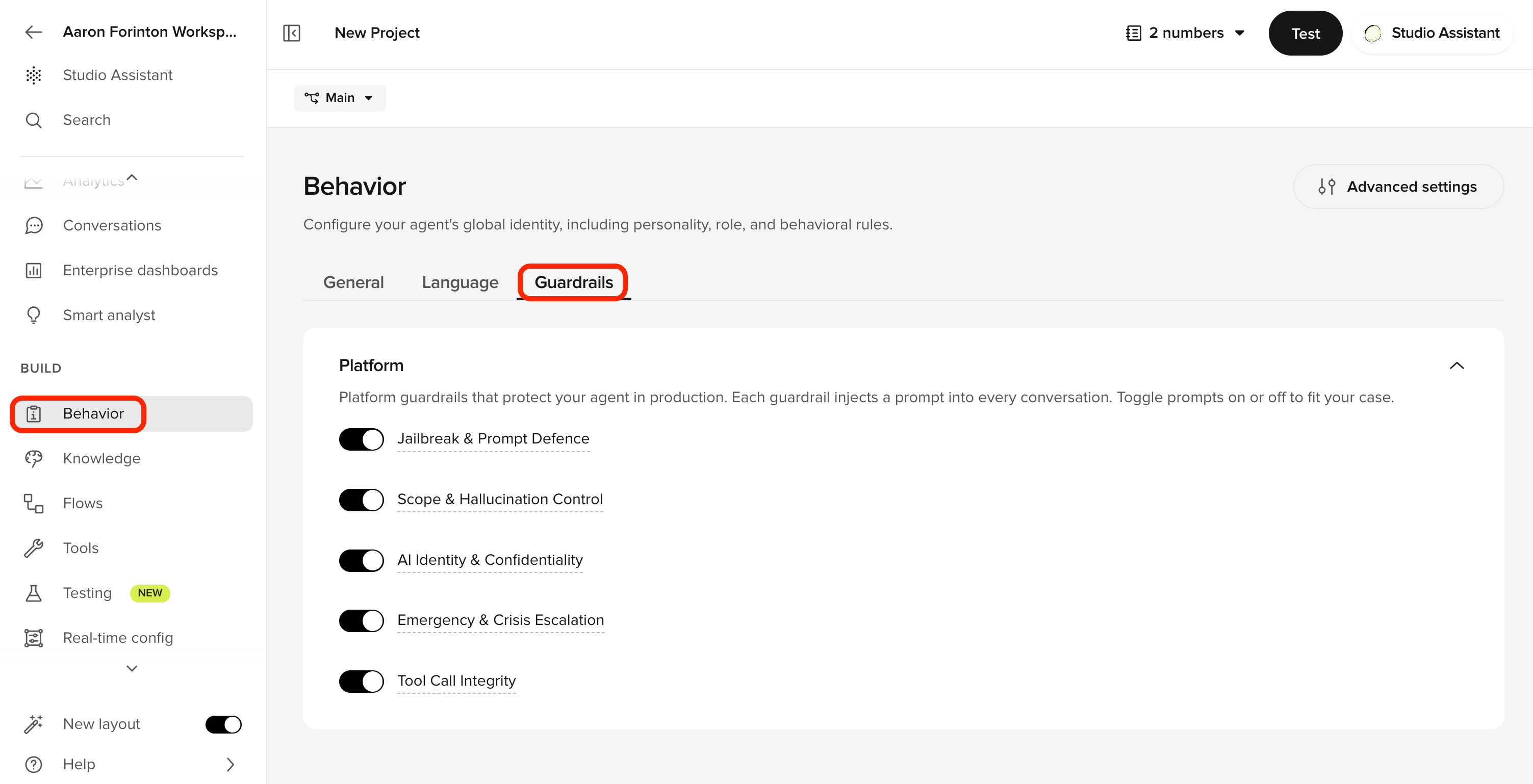
Platform guardrails are pre-built safety protections that PolyAI applies to every conversation. Each one targets a common production risk. All five are enabled by default and can be toggled off at any time.
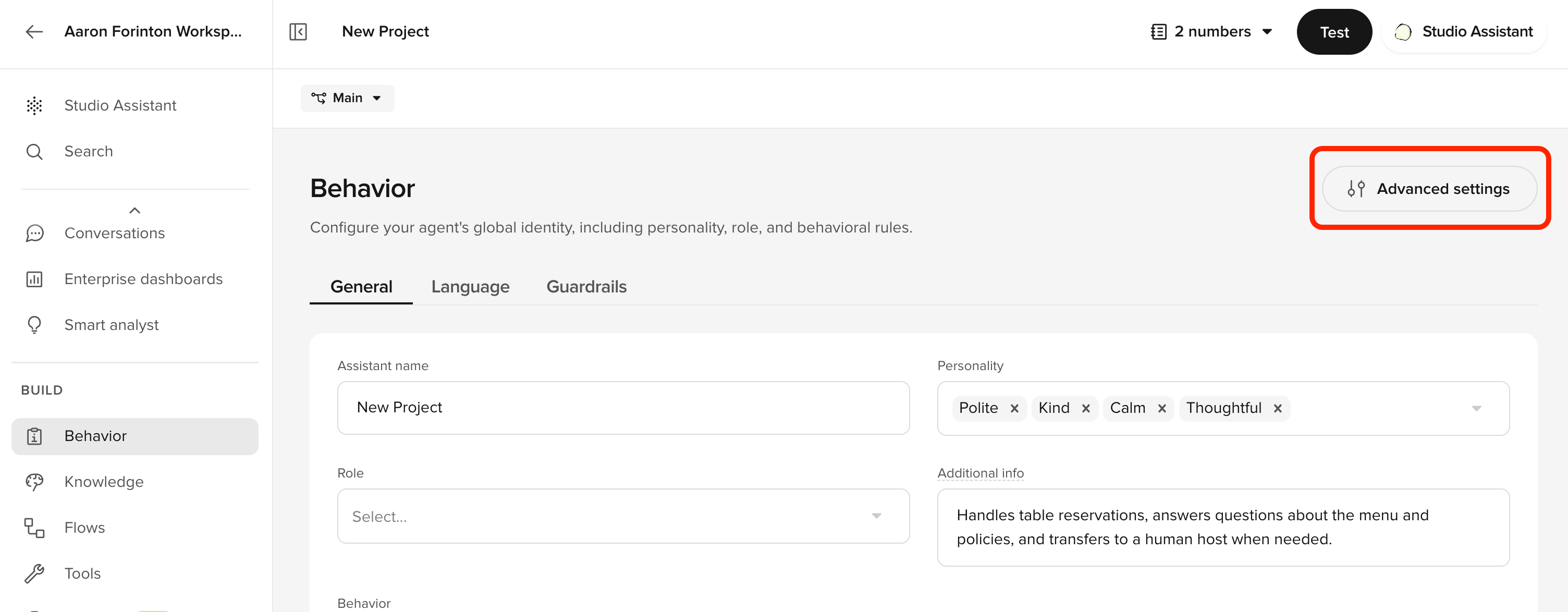
The **Behavior** page is organized into three tabs — **General**, **Language**, and **Guardrails**. Manage in **Advanced behavior settings**, where the input/output [safety filters](/behavior/guardrails/safety-filters) live.
 Platform guardrails are applied automatically, standardized across projects, and maintained by PolyAI — no per-agent prompt engineering required.
## The five guardrails
The underlying prompts are managed by PolyAI and are not currently visible or editable in Agent Studio.
| Guardrail | What it does |
| --------------------------------- | ----------------------------------------------------------------------------------------------------------------------------------------------------------------------------- |
| **Jailbreak & Prompt Defence** | Blocks attempts to extract your agent's instructions, override its behavior, or impersonate a different AI. |
| **Scope & Hallucination Control** | Restricts the agent to its knowledge base. Prevents fabrication of phone numbers, prices, or policies. |
| **AI Identity & Confidentiality** | Prevents the agent from disclosing which LLM, provider, or platform powers it. |
| **Emergency & Crisis Escalation** | Escalates immediately if a caller expresses suicidal ideation, self-harm, threats, or a medical emergency. Catches conversational distress signals that content filters miss. |
| **Tool Call Integrity** | Prevents the agent from speaking internal function calls or tool names aloud. |
## Enable or disable a guardrail
1. Open **Behavior** and select the **Guardrails** tab.
2. Toggle a guardrail off or on. Disabling prompts you to confirm.
3. Test with **Chat with Agent** before promoting to a higher environment.
## Observe when guardrails fire
Guardrail events are recorded on every conversation.
* **In a transcript:** open a conversation in [Conversations](/analytics/conversations/review), open transcript display options, and toggle on **Guardrails**. Each turn where a guardrail fired is annotated inline.
* **Across conversations:** filter by guardrail in the **QA category** of the conversation filters.
* Guardrails are stored per-project and travel through [environments and versions](/environments-and-versions/introduction) – the configuration is part of each published version.
## How guardrails fit with safety filters
Platform guardrails are **prompt-level** instructions to the LLM. They run alongside the input/output [safety filters](/behavior/guardrails/safety-filters):
* **Safety filters** classify each user input and agent output against hate, violence, sexual, and self-harm categories at the model layer. Configure thresholds per category in **Advanced behavior settings** (via the **Advanced settings** button on the Behavior page) and override per channel.
* **Jailbreak detection** is always-on at the model layer and is independent of the Jailbreak & Prompt Defence guardrail. The guardrail tells the LLM how to respond; the detector blocks input upstream.
* **Emergency & Crisis Escalation** catches conversational distress signals that content filters miss – for example, "I don't want to be here anymore" said in a measured tone.
Use guardrails and safety filters together. They protect different layers.
## Related pages
Add custom rules for terminology, tone, and edge cases on top of the platform guardrails.
See guardrail events inline in transcripts and filter by guardrail in QA category.
Per-channel content filters for hate, sexual, violence, and self-harm.
Build a dashboard to track jailbreak attempts and other safety signals.
Validate guardrail behavior in the preview before promoting a version.
Platform guardrails are applied automatically, standardized across projects, and maintained by PolyAI — no per-agent prompt engineering required.
## The five guardrails
The underlying prompts are managed by PolyAI and are not currently visible or editable in Agent Studio.
| Guardrail | What it does |
| --------------------------------- | ----------------------------------------------------------------------------------------------------------------------------------------------------------------------------- |
| **Jailbreak & Prompt Defence** | Blocks attempts to extract your agent's instructions, override its behavior, or impersonate a different AI. |
| **Scope & Hallucination Control** | Restricts the agent to its knowledge base. Prevents fabrication of phone numbers, prices, or policies. |
| **AI Identity & Confidentiality** | Prevents the agent from disclosing which LLM, provider, or platform powers it. |
| **Emergency & Crisis Escalation** | Escalates immediately if a caller expresses suicidal ideation, self-harm, threats, or a medical emergency. Catches conversational distress signals that content filters miss. |
| **Tool Call Integrity** | Prevents the agent from speaking internal function calls or tool names aloud. |
## Enable or disable a guardrail
1. Open **Behavior** and select the **Guardrails** tab.
2. Toggle a guardrail off or on. Disabling prompts you to confirm.
3. Test with **Chat with Agent** before promoting to a higher environment.
## Observe when guardrails fire
Guardrail events are recorded on every conversation.
* **In a transcript:** open a conversation in [Conversations](/analytics/conversations/review), open transcript display options, and toggle on **Guardrails**. Each turn where a guardrail fired is annotated inline.
* **Across conversations:** filter by guardrail in the **QA category** of the conversation filters.
* Guardrails are stored per-project and travel through [environments and versions](/environments-and-versions/introduction) – the configuration is part of each published version.
## How guardrails fit with safety filters
Platform guardrails are **prompt-level** instructions to the LLM. They run alongside the input/output [safety filters](/behavior/guardrails/safety-filters):
* **Safety filters** classify each user input and agent output against hate, violence, sexual, and self-harm categories at the model layer. Configure thresholds per category in **Advanced behavior settings** (via the **Advanced settings** button on the Behavior page) and override per channel.
* **Jailbreak detection** is always-on at the model layer and is independent of the Jailbreak & Prompt Defence guardrail. The guardrail tells the LLM how to respond; the detector blocks input upstream.
* **Emergency & Crisis Escalation** catches conversational distress signals that content filters miss – for example, "I don't want to be here anymore" said in a measured tone.
Use guardrails and safety filters together. They protect different layers.
## Related pages
Add custom rules for terminology, tone, and edge cases on top of the platform guardrails.
See guardrail events inline in transcripts and filter by guardrail in QA category.
Per-channel content filters for hate, sexual, violence, and self-harm.
Build a dashboard to track jailbreak attempts and other safety signals.
Validate guardrail behavior in the preview before promoting a version.