> ## Documentation Index
> Fetch the complete documentation index at: https://polyai-mintlify-7055a538.mintlify.site/llms.txt
> Use this file to discover all available pages before exploring further.
# RCS API
> Send and receive rich, interactive messages (images, videos, rich cards, carousels, location pins) over RCS, with automatic SMS fallback.
## Overview
RCS (Rich Communication Services) is a messaging channel that lets your agent send and receive rich, interactive content (images, videos, graphs and location pins) over the same phone number used for SMS. PolyAI supports RCS through Twilio, alongside standard SMS.
If a customer's device or carrier doesn't support RCS, messages automatically fall back to SMS, so no conversation is ever lost.
Learn more about RCS from Twilio directly: [RCS overview](https://www.twilio.com/docs/messaging/channels/rcs) and [RCS onboarding](https://www.twilio.com/docs/messaging/channels/rcs/onboarding).
## How it works
### Starting and holding a conversation
Your customers can reach your agent over RCS in a few ways:
* **Deep link or QR code.** A customer clicks a link or scans a QR code that opens their device's messaging app with a chat to your agent already started. See [Twilio's guide](https://www.twilio.com/docs/messaging/channels/rcs) and [Google's deep link guide](https://developers.google.com/business-communications/rcs-business-messaging/guides/build/deep-links).
* **Existing contact.** If a customer already has your agent's RCS contact saved, they can start a conversation at any time.
* **SMS fallback.** If a customer texts your fallback number over plain SMS, that conversation stays on SMS for its entire duration; it won't switch to RCS mid-conversation.
After the initial message, the conversation is carried between the user and the agent over the same channel.
### Handoff
Handoff is supported on RCS, in the same way as SMS. See [Chat handoff integrations](/integrations/chat/introduction).
Media transfer from the user to the live agent will soon be enabled alongside text communication.
## Sending messages to customers (outbound)
Outbound RCS messages work the same way as [outbound SMS](/api-reference/messaging/sms-and-rcs-api/send-sms), with two differences:
* You must pass the Twilio Messaging Service SID for your RCS sender in the `messaging_service_sid` field.
* The recipient's number in `user_number` must be prefixed with `rcs:`.
If the recipient's device doesn't support RCS, the message automatically falls back to SMS. No extra handling is needed on your end.
```bash theme={"theme":{"light":"github-light","dark":"github-dark"}}
curl -X POST https://api.us-1.platform.polyai.app/v1/outbound-sms \
-H "X-PolyAi-Auth-Token: YOUR_API_KEY" \
-H "X-TOKEN-ID: YOUR_CONNECTOR_ID" \
-H "Content-Type: application/json" \
-d '{
"message": "Hi Jane, your appointment is confirmed for tomorrow at 2pm. Reply to this message if you need to reschedule.",
"user_number": "rcs:+14155551234",
"messaging_service_sid": "YOUR_TWILIO_MESSAGING_SERVICE_SID"
}'
```
## Getting started
SMS must be set up on your agent, and via Twilio before RCS can be enabled. RCS uses the same phone number as SMS and relies on SMS as its automatic fallback channel.
Before RCS can be enabled for your agent, you'll need:
* **An agent number managed by PolyAI's Twilio account.** This number is used as the SMS fallback whenever RCS isn't available.
* **A registered Twilio RCS sender.** This must be submitted to Google for RCS registration. While registration is pending, the sender can be tested using a developer's test number.
* **A defined list of languages.** These are used to provision the message templates that render components correctly in each language. Currently supported: `en`, `fr`, `es`, `de`.
Speak to your PolyAI representative. They'll coordinate the Twilio setup on your behalf. Once complete, you'll receive a Twilio Messaging Service ID to use for outbound messaging, and your agent's Advanced Configuration in Agent Studio will be updated with the RCS settings automatically.
## Sending and receiving rich content in Agent Studio
### Sending attachments to users
Your agent can send rich media to customers, including images, links, suggested responses and hosted videos, using [the same attachments mechanism as other channels](https://docs.poly.ai/tools/classes/conv-object#attachments).
### Image
An image is visualised within a [Twilio’s media widget](https://www.twilio.com/docs/content/twilio-media) which is a frame that contains the image and a caption:
*A media widget with an image*
If the device is not RCS enabled, a text fallback is sent (the device could be smart enough to detect the image inside the link and render it autonomously):
*Serialisation of the media widget with an image*
In Agent Studio, the image is linked to the attachment type `image`.
#### Tool example
**Name:** `show_image`
**LLM description:** *Returns an image attachment*
```python theme={"theme":{"light":"github-light","dark":"github-dark"}}
def show_image(conv: Conversation):
conv.add_attachments([
Attachment(
content_type="image",
content_url="https://picsum.photos/600/400.jpg#564c8f6fa2ce4f2f99c613cdcf888a89",
title="Image 123",
)
])
return {
"utterance": "Here is the image 123"
}
```
### Video
A video is visualised within a Twilio’s media widget which is a frame that contains the video and a caption:
*A media widget with a video*
If the device is not RCS enabled, a text fallback is sent in the same way as the image serialisation. Remember rich media types like video will incur additional costs to send from Twilio, do contact your Twilio rep when costing.
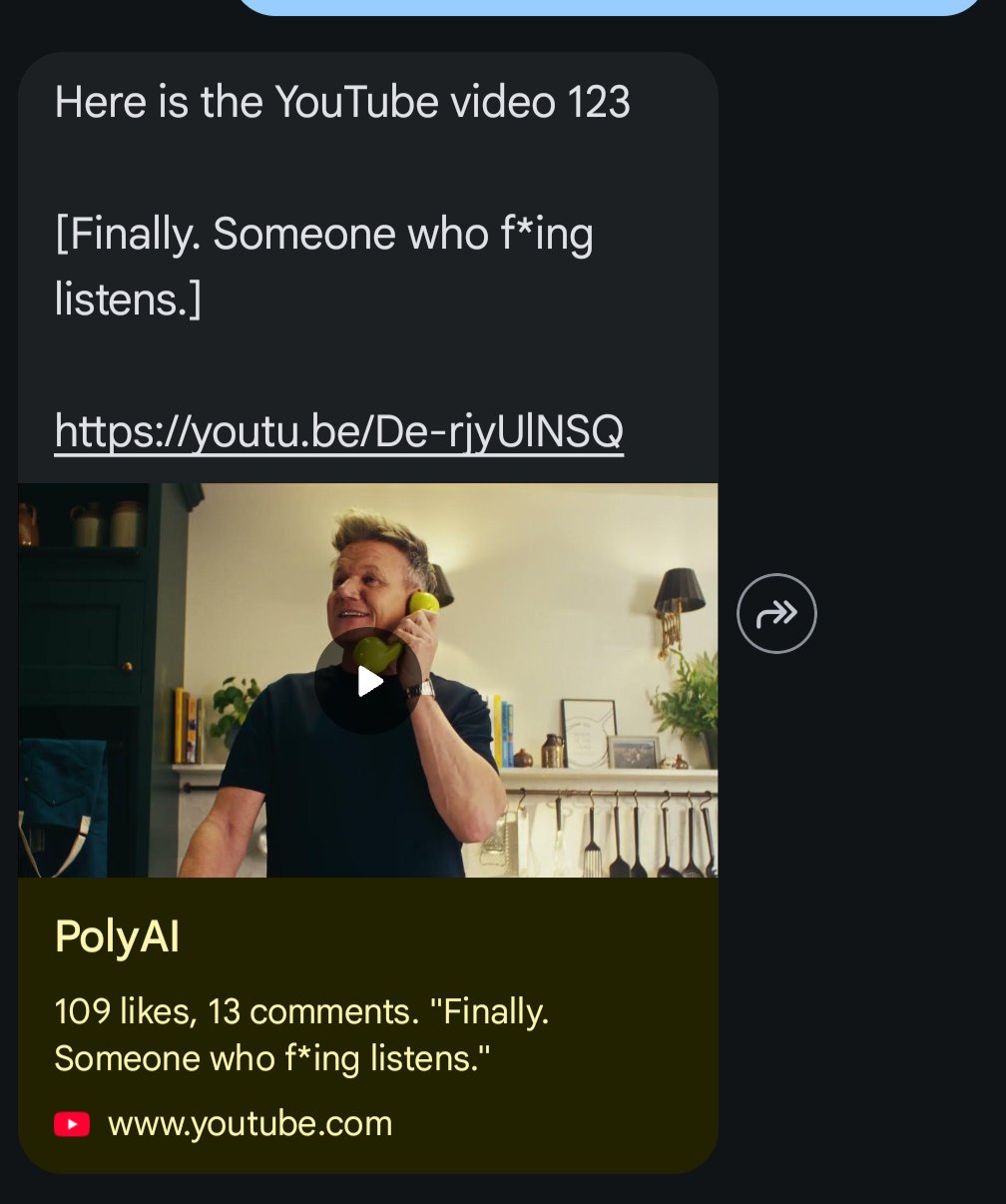
If the video is a YouTube one, it is always serialised. If the device is smart enough, a preview is shown autonomously:
In Agent Studio, the video is linked to the attachment type `video`.
#### Tool example
**Name:** `show_video`
**LLM description:** *Returns a video attachment*
```python theme={"theme":{"light":"github-light","dark":"github-dark"}}
def show_image(conv: Conversation):
conv.add_attachments([
Attachment(
content_type="image",
content_url="https://loremipsum.video/vt/powerpoint-1.mp4",
title=f"Video 123",
)
])
return {
"utterance": f"Here is the video 123"
}
```
### Carousel
A carousel widget is a sliding sequence of rich cards, each containing an image to show, a text and a CTA leading the user to an external link.
Depending on the number of items in the list, the RCS client will render the following:
* A **carousel** if we have from 2 to 10 cards to show (Please note, carousels incur a significant cost to serve - do contact your Twilio rep to support forecast in spend.)
*A carousel widget with some items*
The label of the CTA is hardcoded in the Twilio template.
* A single **rich card** if there's only one attachment
The label of the CTA is hardcoded in the Twilio template.
* Both fall back to plain text automatically if the customer's device doesn't support RCS
The label of the CTA comes from the Agent Studio function - see below.
In Agent Studio, a carousel is linked to the attachment type `weblink`.
Attachments sent to the user are **not visible in Conversation Review**.
#### Tool example
**Name:** `show_carousel`
**LLM description:** *Returns a carousel*
```python theme={"theme":{"light":"github-light","dark":"github-dark"}}
def show_carousel(conv: Conversation):
conv.add_attachments([
Attachment(
content_type="weblink",
content_url="https://www.example.com",
title="Weblink number 1",
preview_image_url="https://picsum.photos/600/400.jpg",
call_to_action="Read more", # Used when serialising
),
Attachment(
content_type="weblink",
content_url="https://www.example.com",
title="Weblink number 2",
preview_image_url="https://picsum.photos/600/400.jpg",
call_to_action="Read more"
),
Attachment(
content_type="weblink",
content_url="https://www.example.com",
title="Weblink number 3",
preview_image_url="https://picsum.photos/600/400.jpg",
call_to_action="Read more"
)
])
return {
"utterance": "Here is carousel 123"
}
```
## Suggesting responses
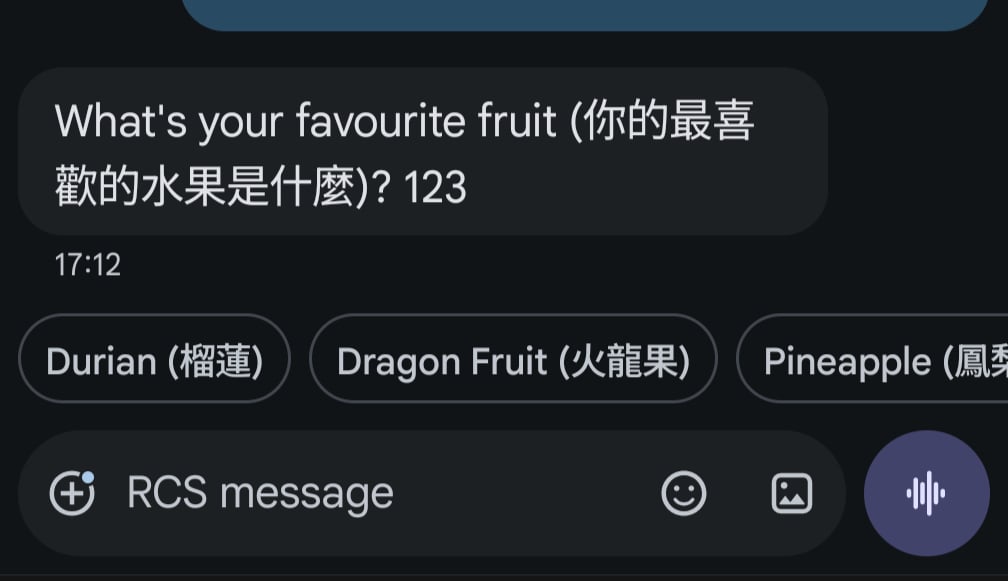
The agent is able to suggest a maximum of 3 responses which will render as chips in the RCS UI:
*Response suggestions as chips*
The tap of a chip will be forwarded to the agent as a user message with exactly the text inside the chip.
If the device is not RCS enabled, a text fallback is sent:
*Serialisation of response suggestions*
The user will have to write their message by hand.
In Agent Studio, response suggestions can be added by using the method `set_response_suggestions` of the `Conversation` object (see here).
### Tool example
**Name: `show_response_suggestions`**
**LLM description:** *Returns a list of response suggestions*
```python theme={"theme":{"light":"github-light","dark":"github-dark"}}
def show_response_suggestions(conv: Conversation):
conv.set_response_suggestions([
"Durian (榴蓮)",
"Dragon Fruit (火龍果)",
"Pineapple (鳳梨)",
])
return {
"utterance": "What's your favourite fruit (你的最喜歡的水果是什麼)?"
}
```
If the customer's device doesn't support RCS, the content falls back to plain text automatically. Attachments sent to the user are not visible in Conversation Review.
More advanced UI components (for example, interactive cards, or richer layouts) are possible but incur an additional cost from Twilio. Speak to your PolyAI representative if this is required.
### Receiving attachments from users
Customers can send your agent images, videos, voice notes, location pins, and button taps.
Attachments reach the agent in various shapes (see below). The agent can access them and handle them accordingly. When media is shared, the user selects the media and, at the moment of sending, the carrier stores it in a bucket and returns a URL pointer. That URL is what the agent sees and can relay upstream or open.
These attachments aren't shown in Conversation Review directly. Instead, a marker is inserted into the conversation to tell the LLM that attachments were sent:
```text theme={"theme":{"light":"github-light","dark":"github-dark"}}
list of metadata type tags attached
```
The marker can contain any combination of:
* `` — the user sent an image, video, or audio file.
* `` — the user sent a location pin (latitude/longitude).
* `` — the user tapped a call-to-action button on a rich card or carousel.
The underlying data is available on the `Conversation` object at `conv.integration_attributes.get("metadata")`, keyed by metadata type.
#### Examples
**``**
```json theme={"theme":{"light":"github-light","dark":"github-dark"}}
{
"media": [
{ "content_type": "image/jpeg", "url": "https://api.twilio.com/.../Media/ME123" },
{ "content_type": "application/pdf", "url": "https://api.twilio.com/.../Media/ME456" }
]
}
```
**``**
```json theme={"theme":{"light":"github-light","dark":"github-dark"}}
{
"location": {
"latitude": "51.5074",
"longitude": "-0.1278",
"address": "10 Downing St, London",
"label": "Home"
}
}
```
**``**
```json theme={"theme":{"light":"github-light","dark":"github-dark"}}
{
"button": {
"payload": "order_123_confirm",
"text": "Confirm order",
"type": "postback"
}
}
```
A metadata tag like `` would map to:
```json theme={"theme":{"light":"github-light","dark":"github-dark"}}
{
"metadata": {
"button": { },
"location": { },
"media": [ ]
}
}
```
#### Tool example: `parse_metadata`
**LLM description:** Parse user message when a metadata tag is passed.
**Request parameters:**
| Name | Context description | Type |
| --------- | -------------------------------------------------------------------- | ------ |
| `message` | The full message comprising any `` tag and any extra text. | String |
```python theme={"theme":{"light":"github-light","dark":"github-dark"}}
import json
METADATA_TAG = ""
def parse_metadata(conv: Conversation, message: str):
if METADATA_TAG not in message:
return {
"utterance": f"No metadata signature found in message: {message}"
}
if not conv.integration_attributes:
return {
"utterance": "No integration_attributes found"
}
metadata = conv.integration_attributes.get("metadata")
if metadata is None:
return {
"utterance": "No metadata found"
}
return {
"utterance": f"{message}\n{json.dumps(metadata)}"
}
```
## Opt-in and opt-out
Users can opt in or out of RCS communication. For RCS, PolyAI enables Twilio's advanced configuration, which allows the agent to receive notifications when the user sends a `STOP` or `START` keyword. By adding specific knowledge or tools, you can customise the agent's behaviour for these cases. The agent always receives the strings `STOP` and `START`, regardless of the actual word used by the user (which must be defined in Twilio, along with any localisation).
The possible cases are:
* **Opt-out.** The user receives the default info message defined in Twilio. The agent receives `STOP`, and any reply from the agent is **not** forwarded to the user, but is recorded in Conversation Review.
* **Opt-in.** The user receives the default info message defined in Twilio. The agent receives `START`, and any reply from the agent **is** forwarded to the user and recorded in Conversation Review. You may want to trigger a tool that drops the utterance so the user does not receive a duplicate message.
* **Between opt-out and opt-in.** Any message sent by the user does not reach either the agent or Conversation Review.
* **Help.** When the user asks for `HELP`, they receive the default info message defined in Twilio. This message does not reach either the agent or Conversation Review.
## Related
* [SMS API](/api-reference/sms/introduction)
* [Send an outbound SMS/RCS](/api-reference/messaging/sms-and-rcs-api/send-sms)
* [Chat handoff integrations](/integrations/chat/introduction)
 *A media widget with an image*
If the device is not RCS enabled, a text fallback is sent (the device could be smart enough to detect the image inside the link and render it autonomously):
*A media widget with an image*
If the device is not RCS enabled, a text fallback is sent (the device could be smart enough to detect the image inside the link and render it autonomously):
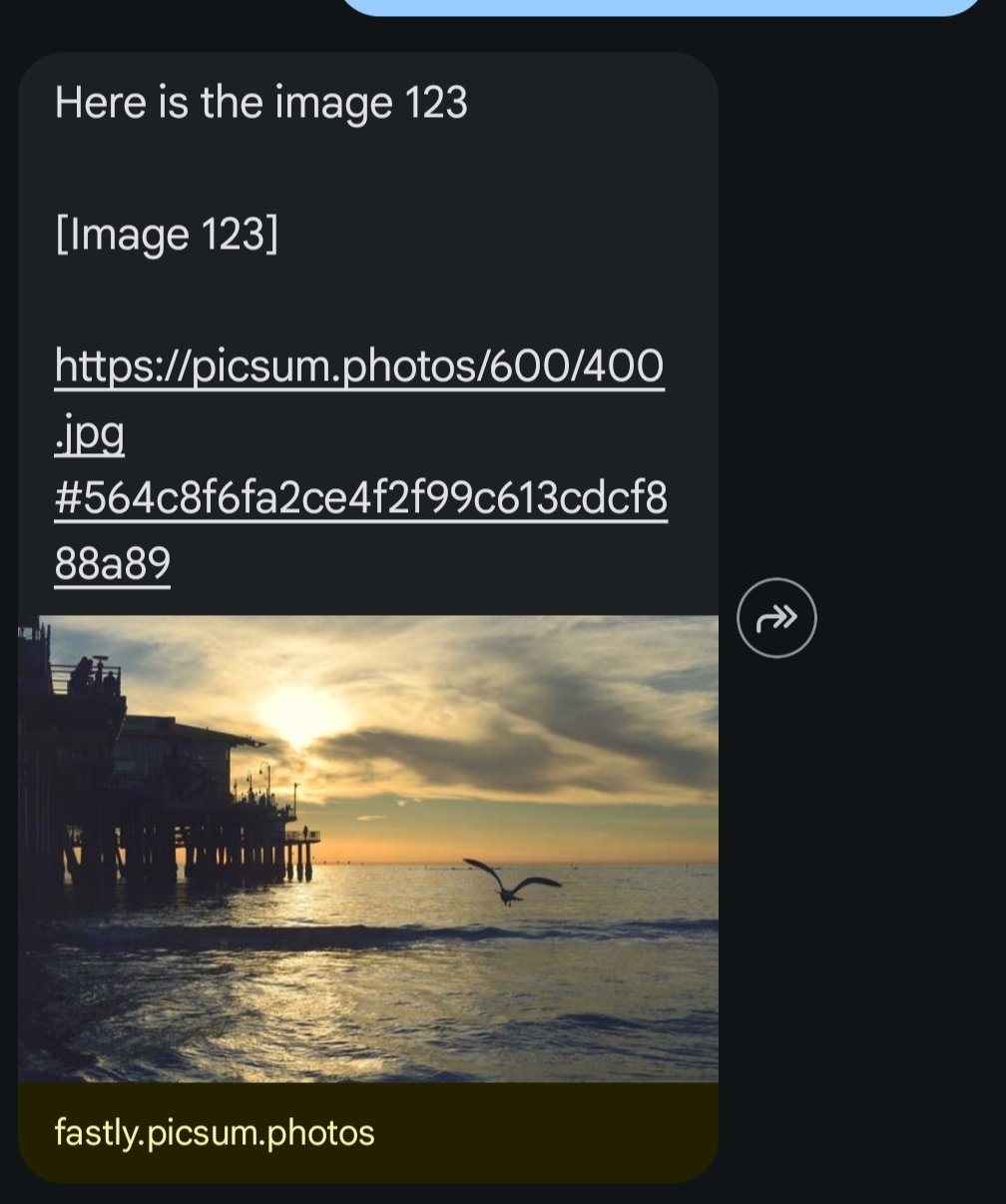 *Serialisation of the media widget with an image*
In Agent Studio, the image is linked to the attachment type `image`.
#### Tool example
**Name:** `show_image`
**LLM description:** *Returns an image attachment*
```python theme={"theme":{"light":"github-light","dark":"github-dark"}}
def show_image(conv: Conversation):
conv.add_attachments([
Attachment(
content_type="image",
content_url="https://picsum.photos/600/400.jpg#564c8f6fa2ce4f2f99c613cdcf888a89",
title="Image 123",
)
])
return {
"utterance": "Here is the image 123"
}
```
### Video
A video is visualised within a Twilio’s media widget which is a frame that contains the video and a caption:
*Serialisation of the media widget with an image*
In Agent Studio, the image is linked to the attachment type `image`.
#### Tool example
**Name:** `show_image`
**LLM description:** *Returns an image attachment*
```python theme={"theme":{"light":"github-light","dark":"github-dark"}}
def show_image(conv: Conversation):
conv.add_attachments([
Attachment(
content_type="image",
content_url="https://picsum.photos/600/400.jpg#564c8f6fa2ce4f2f99c613cdcf888a89",
title="Image 123",
)
])
return {
"utterance": "Here is the image 123"
}
```
### Video
A video is visualised within a Twilio’s media widget which is a frame that contains the video and a caption:
 *A media widget with a video*
If the device is not RCS enabled, a text fallback is sent in the same way as the image serialisation. Remember rich media types like video will incur additional costs to send from Twilio, do contact your Twilio rep when costing.
If the video is a YouTube one, it is always serialised. If the device is smart enough, a preview is shown autonomously:
*A media widget with a video*
If the device is not RCS enabled, a text fallback is sent in the same way as the image serialisation. Remember rich media types like video will incur additional costs to send from Twilio, do contact your Twilio rep when costing.
If the video is a YouTube one, it is always serialised. If the device is smart enough, a preview is shown autonomously:
 In Agent Studio, the video is linked to the attachment type `video`.
#### Tool example
**Name:** `show_video`
**LLM description:** *Returns a video attachment*
```python theme={"theme":{"light":"github-light","dark":"github-dark"}}
def show_image(conv: Conversation):
conv.add_attachments([
Attachment(
content_type="image",
content_url="https://loremipsum.video/vt/powerpoint-1.mp4",
title=f"Video 123",
)
])
return {
"utterance": f"Here is the video 123"
}
```
### Carousel
A carousel widget is a sliding sequence of rich cards, each containing an image to show, a text and a CTA leading the user to an external link.
Depending on the number of items in the list, the RCS client will render the following:
* A **carousel** if we have from 2 to 10 cards to show (Please note, carousels incur a significant cost to serve - do contact your Twilio rep to support forecast in spend.)
In Agent Studio, the video is linked to the attachment type `video`.
#### Tool example
**Name:** `show_video`
**LLM description:** *Returns a video attachment*
```python theme={"theme":{"light":"github-light","dark":"github-dark"}}
def show_image(conv: Conversation):
conv.add_attachments([
Attachment(
content_type="image",
content_url="https://loremipsum.video/vt/powerpoint-1.mp4",
title=f"Video 123",
)
])
return {
"utterance": f"Here is the video 123"
}
```
### Carousel
A carousel widget is a sliding sequence of rich cards, each containing an image to show, a text and a CTA leading the user to an external link.
Depending on the number of items in the list, the RCS client will render the following:
* A **carousel** if we have from 2 to 10 cards to show (Please note, carousels incur a significant cost to serve - do contact your Twilio rep to support forecast in spend.)
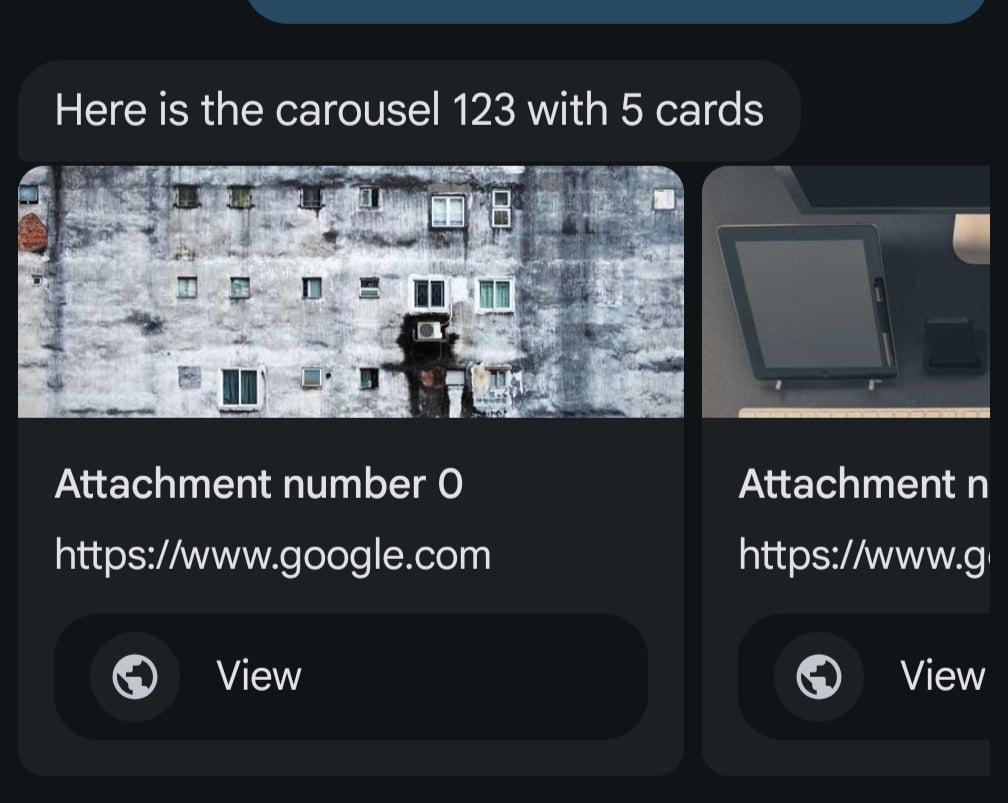 *A carousel widget with some items*
The label of the CTA is hardcoded in the Twilio template.
* A single **rich card** if there's only one attachment
The label of the CTA is hardcoded in the Twilio template.
* Both fall back to plain text automatically if the customer's device doesn't support RCS
The label of the CTA comes from the Agent Studio function - see below.
In Agent Studio, a carousel is linked to the attachment type `weblink`.
*A carousel widget with some items*
The label of the CTA is hardcoded in the Twilio template.
* A single **rich card** if there's only one attachment
The label of the CTA is hardcoded in the Twilio template.
* Both fall back to plain text automatically if the customer's device doesn't support RCS
The label of the CTA comes from the Agent Studio function - see below.
In Agent Studio, a carousel is linked to the attachment type `weblink`.
 *Response suggestions as chips*
The tap of a chip will be forwarded to the agent as a user message with exactly the text inside the chip.
If the device is not RCS enabled, a text fallback is sent:
*Response suggestions as chips*
The tap of a chip will be forwarded to the agent as a user message with exactly the text inside the chip.
If the device is not RCS enabled, a text fallback is sent:
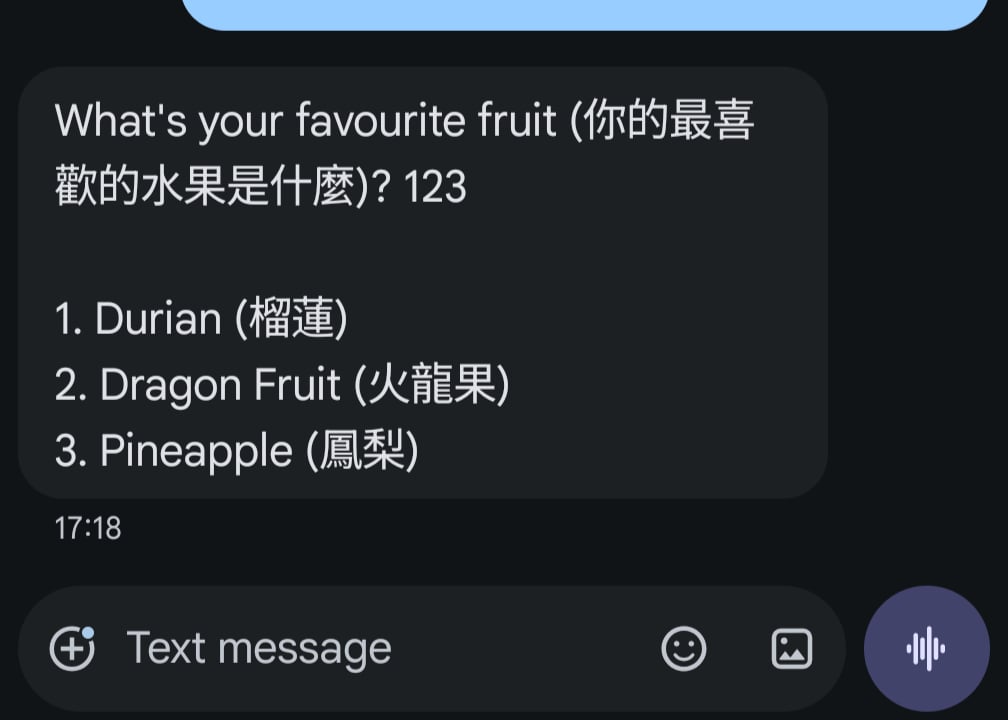 *Serialisation of response suggestions*
The user will have to write their message by hand.
In Agent Studio, response suggestions can be added by using the method `set_response_suggestions` of the `Conversation` object (see here).
### Tool example
**Name: `show_response_suggestions`**
**LLM description:** *Returns a list of response suggestions*
```python theme={"theme":{"light":"github-light","dark":"github-dark"}}
def show_response_suggestions(conv: Conversation):
conv.set_response_suggestions([
"Durian (榴蓮)",
"Dragon Fruit (火龍果)",
"Pineapple (鳳梨)",
])
return {
"utterance": "What's your favourite fruit (你的最喜歡的水果是什麼)?"
}
```
If the customer's device doesn't support RCS, the content falls back to plain text automatically. Attachments sent to the user are not visible in Conversation Review.
*Serialisation of response suggestions*
The user will have to write their message by hand.
In Agent Studio, response suggestions can be added by using the method `set_response_suggestions` of the `Conversation` object (see here).
### Tool example
**Name: `show_response_suggestions`**
**LLM description:** *Returns a list of response suggestions*
```python theme={"theme":{"light":"github-light","dark":"github-dark"}}
def show_response_suggestions(conv: Conversation):
conv.set_response_suggestions([
"Durian (榴蓮)",
"Dragon Fruit (火龍果)",
"Pineapple (鳳梨)",
])
return {
"utterance": "What's your favourite fruit (你的最喜歡的水果是什麼)?"
}
```
If the customer's device doesn't support RCS, the content falls back to plain text automatically. Attachments sent to the user are not visible in Conversation Review.