> ## Documentation Index
> Fetch the complete documentation index at: https://polyai-mintlify-7055a538.mintlify.site/llms.txt
> Use this file to discover all available pages before exploring further.
# PolyScore
> An automated 1–5 conversation quality score for voice, messaging, and email.
**PolyScore** is the automated quality score assigned to every eligible conversation with your agent — a **1–5 rating** backed by an evaluation rubric that works across voice, messaging, and email, for both inbound and outbound conversations.
Scores appear on your charts on the [Analytics](/analytics/dashboards/introduction) page and on individual conversations in [Conversation review](/analytics/conversations/review).
 ## How the score works
Every conversation is evaluated on two questions:
| Dimension | Question | Outcomes |
| ----------------- | ------------------------------------------------------------------------------------------------------------------------------------------------ | --------------------------------------------------------------------------- |
| **Agent quality** | Did the agent handle the exchange competently — understanding the user, avoiding forced repeats, not causing frustration through its own faults? | Good / Fair / Poor |
| **Task success** | Did the conversation deliver on its objective, so the user won't need to make contact again for the same reason? | Good (Completed) / Fair (Handoff or decline honored) / Poor (Not completed) |
The 1–5 scale mirrors CSAT, so PolyScore reads naturally alongside the customer-satisfaction metrics you already use.
### Which conversations get scored
Conversations need to meet two criteria to be scored:
* **Is the user engaged?** That is, was it possible for the agent to do its job. Spam calls, silent calls, or conversations where a user instantly requests a human count as not engaged.
* **Have there been more than 3 user turns in the conversation?** This only scores conversations where some interaction took place.
When a conversation isn't scored, the reason is shown explicitly on the conversation.
### How the two dimensions combine
| PolyScore | Typical conversation |
| --------- | ------------------------------------------------------------------------------------------------------------------------ |
| **5** | Understood cleanly and fully resolved (or a clear self-service path given) |
| **4** | Strong on one dimension — for example, handled well but ended in a handoff, or resolved despite a minor misunderstanding |
| **3** | Middling on both — for example, some friction and a handoff |
| **2** | Weak on both dimensions |
| **1** | The agent got stuck or repeatedly misunderstood, and the conversation ended unresolved with no handoff |
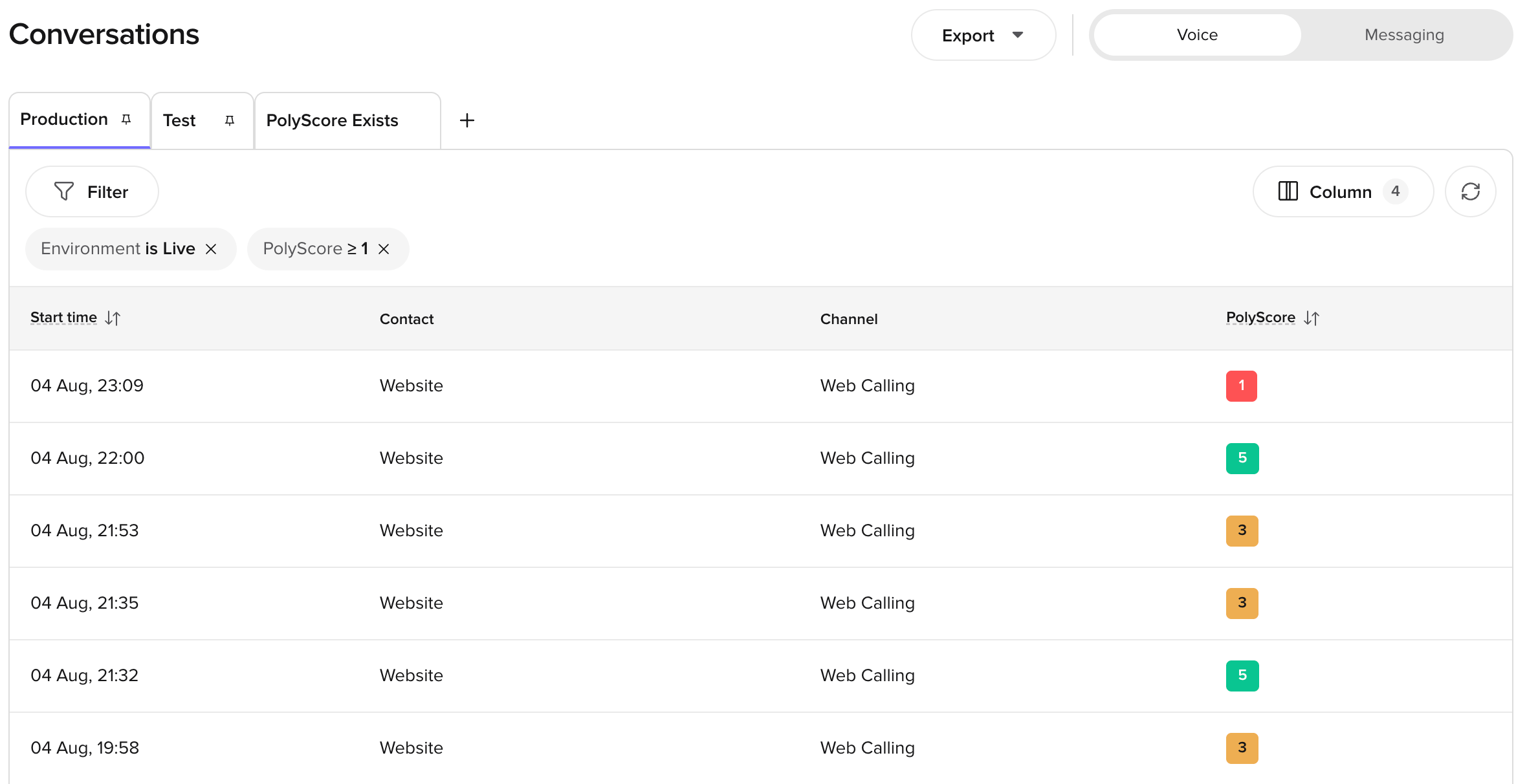
The overall score is shown as a color-coded badge in [Conversation review](/analytics/conversations/review):
| Range | Label | Color |
| ----- | ------ | ----- |
| 5 | High | Green |
| 3–4 | Medium | Amber |
| 1–2 | Low | Red |
## How to read the score
These rubric decisions matter most when interpreting a score:
* **Handoffs result in a neutral Task Success outcome.** From the user's perspective the outcome is identical: they were routed to a person. A handoff is never scored as "not completed" — that rating is reserved for genuine dead-ends where the user got nothing and nobody. A handoff due to a struggling agent is penalized through the Agent Quality sub-score instead.
* **Self-service paths score as completed.** If the agent gives the user a concrete path they can complete themselves — *"you can reset your PIN any time at acme.com/pin"* — that scores as fully completed, the same as resolving it in-conversation. For many agents, routing users to self-service *is* the designed job; penalizing it would punish the configuration you chose.
* **Frustration only counts against the agent when the agent caused it.** Unhappiness with a policy or outcome doesn't penalize the agent; being stuck in a loop does.
* **Design choices aren't penalized.** To the extent that this can be inferred from the transcript, if your agent is configured to deflect or decline certain requests, executing that correctly scores as competent handling.
* **Outbound declines result in a neutral Task Success.** A polite *"not interested, remove me,"* honored cleanly, is scored as the agent doing its job.
## Where PolyScore appears
* **Conversation review** — score badge at the top of each transcript, with expandable dimension breakdowns.
* **Conversations table** — sortable PolyScore column for quick quality scanning.
* **Home page** — average PolyScore trend chart under Quick Insights.
* **Wren** — use PolyScore as a sampling criterion or query PolyScore tables directly via SQL.
* **Conversations API** — PolyScore data is available in the API response when the conversation has been scored.
## Limitations
PolyScore evaluates conversations based on the transcript alone. It does not have access to your knowledge base, flows, external systems, or expected outcomes.
This means:
* PolyScore **cannot verify whether an action was actually completed** in an external system (for example, a booking made, an appointment canceled). It can only assess whether the conversation *appeared* to resolve the task based on what was said.
* PolyScore does not know what the agent *should* have said — only what it *did* say. If the agent confidently gave an incorrect answer, PolyScore may still rate the conversation highly.
* Scores reflect conversational quality, not business accuracy. Use PolyScore alongside your own QA processes and [custom metrics](/analytics/kpis/introduction) for a complete picture.
PolyScore is available for conversations from **28 July 2026** onwards. Earlier conversations were scored on the previous 0–10 scale and no longer carry a PolyScore.
***
Questions? Reach out to your PolyAI account team.
## Related pages
View per-dimension PolyScore breakdowns alongside transcripts.
Ask Wren to query PolyScore data and sample conversations by score.
Access transcripts and call summaries.
## How the score works
Every conversation is evaluated on two questions:
| Dimension | Question | Outcomes |
| ----------------- | ------------------------------------------------------------------------------------------------------------------------------------------------ | --------------------------------------------------------------------------- |
| **Agent quality** | Did the agent handle the exchange competently — understanding the user, avoiding forced repeats, not causing frustration through its own faults? | Good / Fair / Poor |
| **Task success** | Did the conversation deliver on its objective, so the user won't need to make contact again for the same reason? | Good (Completed) / Fair (Handoff or decline honored) / Poor (Not completed) |
The 1–5 scale mirrors CSAT, so PolyScore reads naturally alongside the customer-satisfaction metrics you already use.
### Which conversations get scored
Conversations need to meet two criteria to be scored:
* **Is the user engaged?** That is, was it possible for the agent to do its job. Spam calls, silent calls, or conversations where a user instantly requests a human count as not engaged.
* **Have there been more than 3 user turns in the conversation?** This only scores conversations where some interaction took place.
When a conversation isn't scored, the reason is shown explicitly on the conversation.
### How the two dimensions combine
| PolyScore | Typical conversation |
| --------- | ------------------------------------------------------------------------------------------------------------------------ |
| **5** | Understood cleanly and fully resolved (or a clear self-service path given) |
| **4** | Strong on one dimension — for example, handled well but ended in a handoff, or resolved despite a minor misunderstanding |
| **3** | Middling on both — for example, some friction and a handoff |
| **2** | Weak on both dimensions |
| **1** | The agent got stuck or repeatedly misunderstood, and the conversation ended unresolved with no handoff |
The overall score is shown as a color-coded badge in [Conversation review](/analytics/conversations/review):
| Range | Label | Color |
| ----- | ------ | ----- |
| 5 | High | Green |
| 3–4 | Medium | Amber |
| 1–2 | Low | Red |
## How to read the score
These rubric decisions matter most when interpreting a score:
* **Handoffs result in a neutral Task Success outcome.** From the user's perspective the outcome is identical: they were routed to a person. A handoff is never scored as "not completed" — that rating is reserved for genuine dead-ends where the user got nothing and nobody. A handoff due to a struggling agent is penalized through the Agent Quality sub-score instead.
* **Self-service paths score as completed.** If the agent gives the user a concrete path they can complete themselves — *"you can reset your PIN any time at acme.com/pin"* — that scores as fully completed, the same as resolving it in-conversation. For many agents, routing users to self-service *is* the designed job; penalizing it would punish the configuration you chose.
* **Frustration only counts against the agent when the agent caused it.** Unhappiness with a policy or outcome doesn't penalize the agent; being stuck in a loop does.
* **Design choices aren't penalized.** To the extent that this can be inferred from the transcript, if your agent is configured to deflect or decline certain requests, executing that correctly scores as competent handling.
* **Outbound declines result in a neutral Task Success.** A polite *"not interested, remove me,"* honored cleanly, is scored as the agent doing its job.
## Where PolyScore appears
* **Conversation review** — score badge at the top of each transcript, with expandable dimension breakdowns.
* **Conversations table** — sortable PolyScore column for quick quality scanning.
* **Home page** — average PolyScore trend chart under Quick Insights.
* **Wren** — use PolyScore as a sampling criterion or query PolyScore tables directly via SQL.
* **Conversations API** — PolyScore data is available in the API response when the conversation has been scored.
## Limitations
PolyScore evaluates conversations based on the transcript alone. It does not have access to your knowledge base, flows, external systems, or expected outcomes.
This means:
* PolyScore **cannot verify whether an action was actually completed** in an external system (for example, a booking made, an appointment canceled). It can only assess whether the conversation *appeared* to resolve the task based on what was said.
* PolyScore does not know what the agent *should* have said — only what it *did* say. If the agent confidently gave an incorrect answer, PolyScore may still rate the conversation highly.
* Scores reflect conversational quality, not business accuracy. Use PolyScore alongside your own QA processes and [custom metrics](/analytics/kpis/introduction) for a complete picture.
PolyScore is available for conversations from **28 July 2026** onwards. Earlier conversations were scored on the previous 0–10 scale and no longer carry a PolyScore.
***
Questions? Reach out to your PolyAI account team.
## Related pages
View per-dimension PolyScore breakdowns alongside transcripts.
Ask Wren to query PolyScore data and sample conversations by score.
Access transcripts and call summaries.